<- Docs

PIWIS III coding fundamentals

Forum reports treat PIWIS III coding as high risk owner work: use strong external power, capture before/after evidence, avoid broad auto coding unless target evidence supports it, and expect version/restore uncertainty.

PIWIS coding June 8, 2026
1 source 42 pages 627 source posts 34 used posts
PIWIS coding context Cayenne E3 9Y0

Source discussion

Initial PIWIS risk and workflow framing

Earliest broad owner warning covering bricking risk, PIWIS III requirement, engineer mode/F7 workflow, and high-current power context

S1Initial PIWIS risk and workflow framingJohn MclaneNov 26, 2020, 5:38 AM UTCView post #17051085

...Proceed at your own risk. you can easily brick one or more modules....

I'd like to start a thread 9YA coding. At the time of this, PIWIS 3 is required, original or clone.

Proceed at your own risk. you can easily brick one or more modules. This is for research only and the car should not be driven at all, nowhere. Not even started. Results will vary. Professional driver on closed course etc.

I'm just starting, the literature on the subject is minimal, but beemers were like that at a point.

Plug in an external battery maintainer. Be careful with that. PlplaWith the PIWIS in engineer mode, connect the car, turn on the ignition.

Diagnostics-F7 (additional menu)- maintenance data- press next until the list of options populate in German.

find the entries for what you want to change.

For example, two entries for

headlights, choose PLDS+ incl Matrix. - Save (F8).

Go back to the initial menu. Choose all modules- programming- automatic programming.

Wait and freak out about the lights and sounds.

Read and delete errors. This is still not tested for full functionality- edit to be added here.

Under F7 there's an option for start stop. One can change it to without (ohne) and live free from that, but that's not good for the environment.

Baby steps. All takes time and patience here. Code more than one thing and you may find yourself sorting for what went wrong, in German.

Tal lots of pictures of the chosen modules so you can backtrack. Google translate is your friend.

It can take some time and voltage fluctuation is your enemy. Find a hefty maintainer. Porsche recommends 90A. I went with 75A. Some use 55A. Check the drain versus your home fuse box.

Let's post experiences here. I know there's a lot of options under coding for several modules, but once connected to the car I could not access (manual coding without rules). In there lies a lot of options.

We should be able to code (for research purposes only), raise and low windows with key fob , close rear deck with key fob, possibly android car (it's there, I've seen it), individualize the dashboard and PCM screens.

Well, good luck to all. I hope this thread helps all of us on this.

F7 Additional menu caution

Clear explanation that vehicle-data changes are defaults for auto programming, not direct module programming

S2F7 Additional menu cautionrbrunelleMay 26, 2021, 8:04 PM UTCView post #17454557

...you are not programming any modules… changing the defaults for when you run auto programming...

So I just found this thread and unfortunately for some, I can see that messing with the auto programming settings has caused some problems. Let me help you understand how the PIWIS works. When you go to the additional menu settings, you are not programming any modules. What you are doing is changing the defaults for when you run auto programming. This is a very dangerous, as this programming should stay stock, so that you can always use auto programming to restore your module back to stock. Also this section lets you add options your car does not have and that causes other modules to be programmed incorrectly. The other modules will look to receive information from missing modules and give you errors if you run auto program all modules. Please leave the auto programing found in the add menu alone, instead, go into the module you need, the go to manual programing. Please note that in Engineering mode, all modules appear present, even they are not in your car. In production mode, those modules are not visible. In engineering mode when you go into the module and go to the extended identifications, if you get 11070 error everywhere, that means your car doesn't have that module.

For example, Auto start Stop is located in the Gateway Module. Select the Gateway module then hit next. Then go to the programing tab and make the changes you need. You can turn off *** here without worries about impacting other modules. If you sell the car, simple run the auto programming for this module and it will be returned to normal.

I hope this helps.

Automatic coding risks and long workflow cautions

Detailed owner report that automatic coding can erase customizations, produce many errors, and requires strong external power
S3Automatic coding risks and long workflow cautionsrunbuhJan 30, 2022, 7:42 PM UTCView post #18510008

...Most codings you have put into place previously will get erased by this process....

This is due to the generous help I've gotten from @rnlst_log , @lsb , and @don16 .
OK - I think (repeat THINK) I found a path for Matrix LED's on US-spec cars. Everything below sounds crazy, I know, but could someone who has time and patience try this:
Requirements:
- US Spec car
- PDLS+ LED Matrix headlights (standard matrix headlights is what I have, the black ones should work, too)
- Recent version of PIWIS III and a knowledge of coding, using the F7 Additional menu, and error/fault clearing (I used version 41.400)
- External power of 70amps or more (do not do this with the engine running, do not do this using a battery tender)
VERY BIG WARNINGS:
- You need to know your way around PIWIS III pretty well. If you're not confident, don't do this. Please.
- Most codings you have put into place previously will get erased by this process. You will need to put them back.
- Even though you are simply going to make changes, do automatic coding, revert the changes, and then do automatic coding again, you could definintely BORK your car. If you can't fix it, seek professional help.
The long and involved process (plan on 2 - 3 hours):
- Go into PIWIS Diags and let it determine your car
- Go to F7 Additional menu
- Step forward to the options (please make good notes about your original settings - you'll be using them shortly)
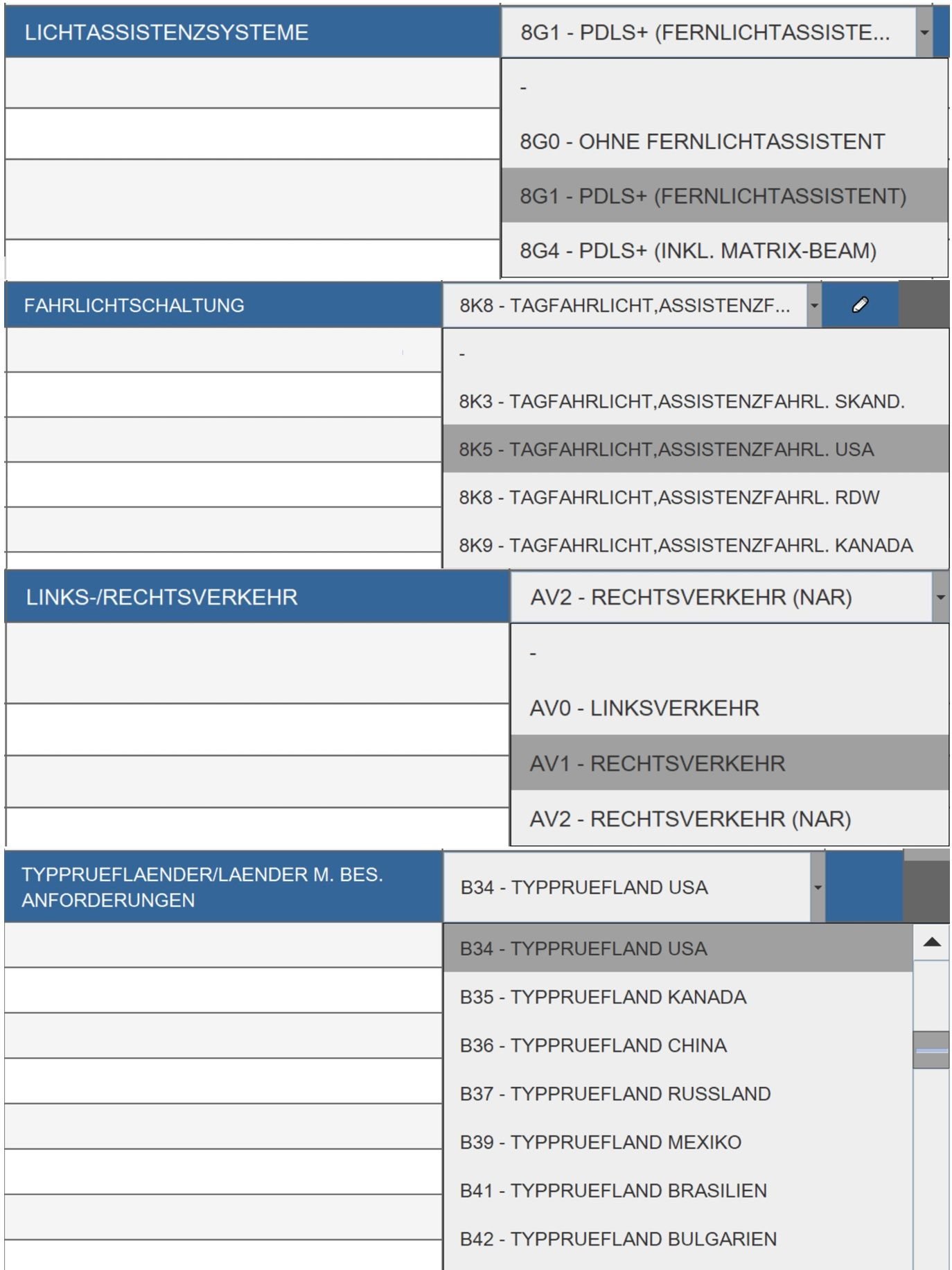
- Change FAHRLICHTSCHALTUNG TO 8K8 (your original setting is probably 8K5)
- Change LICHTASSISTENZSYSTEME to 8G4 (yours is probably set to 8G1)
- Change LINKS-/RECHTSVERKEHR from AV2 to AV1 (make sure yours was originally set to AV2)
- Change TYPPRUEFLAENDER/LAENDER M. BES ANDFORDERUNGEN to B2 (your should have originally been set to B34)
- Click on Save and go to Overview
- Select ALL MODULES (Ctrl-A makes this easy)
- Go to Coding
- Select Automatic Coding (just plain Automatic Coding)
- Let it do it's thing - this will take a while, and you will get a TON of errors, and your instrument panel will switch to German (PCM will likely stay english). You may also note that your turn signals no longer function.
- If your emergency brake is being whiny, put your foot firmly on the brake pedal, press the e brake button down (maybe hold it for 2 seconds), then lift the button up (hold it for 2 second). Repeat if the e-brake is still being whiny.
- Use your PIWIS to clear all errors, but some will remain - this is to be expected (especially lighting errors, and maybe even the allrad (All Wheel Drive). This is ok.
- This step is likely optional, but it's what I did: Start your car, put it in gear, and then put it right back in park. I did this just to check the emergency brake operation.
- Cut the car off, leave PIWIS and external power connected and running. Walk away. Have a cup of coffee. Do somthing for 15-20 minutes (again - this step is probably not necessary, but it's what I did)
- Now - repeat the steps above, except change everything back to your original settings (your wrote those down earlier, right?)
**** IMPORTANT EDIT: Leave LICHTASSISTENZSYSTEME set to 8G4 ****
- Fix your whiny emergency brake again
- I started my car, put it in gear, put it in park, etc. (probably not needed)
- I took the time at this point to swap the PIWIS for my Launch and put my other codings back into place (seat belt chime off, sidemarker flashes with turnsignal, etc.). Most codings you have put into place previously will get erased by this process. You will need to put them back.
- Disconnect everything, lock up, and walk away for a while (another 15-20 minutes - probably not needed, but it's what I did)
- Go test it out on a dark road where you might get some cars coming the other way (make sure your high beams are on - blue light on the instrument panel)
Some screen shots of the settings I'm talking about:


Auto-coding recovery pattern and failure symptoms

Concrete owner report about reverting non-target values and rerunning auto coding after severe symptoms
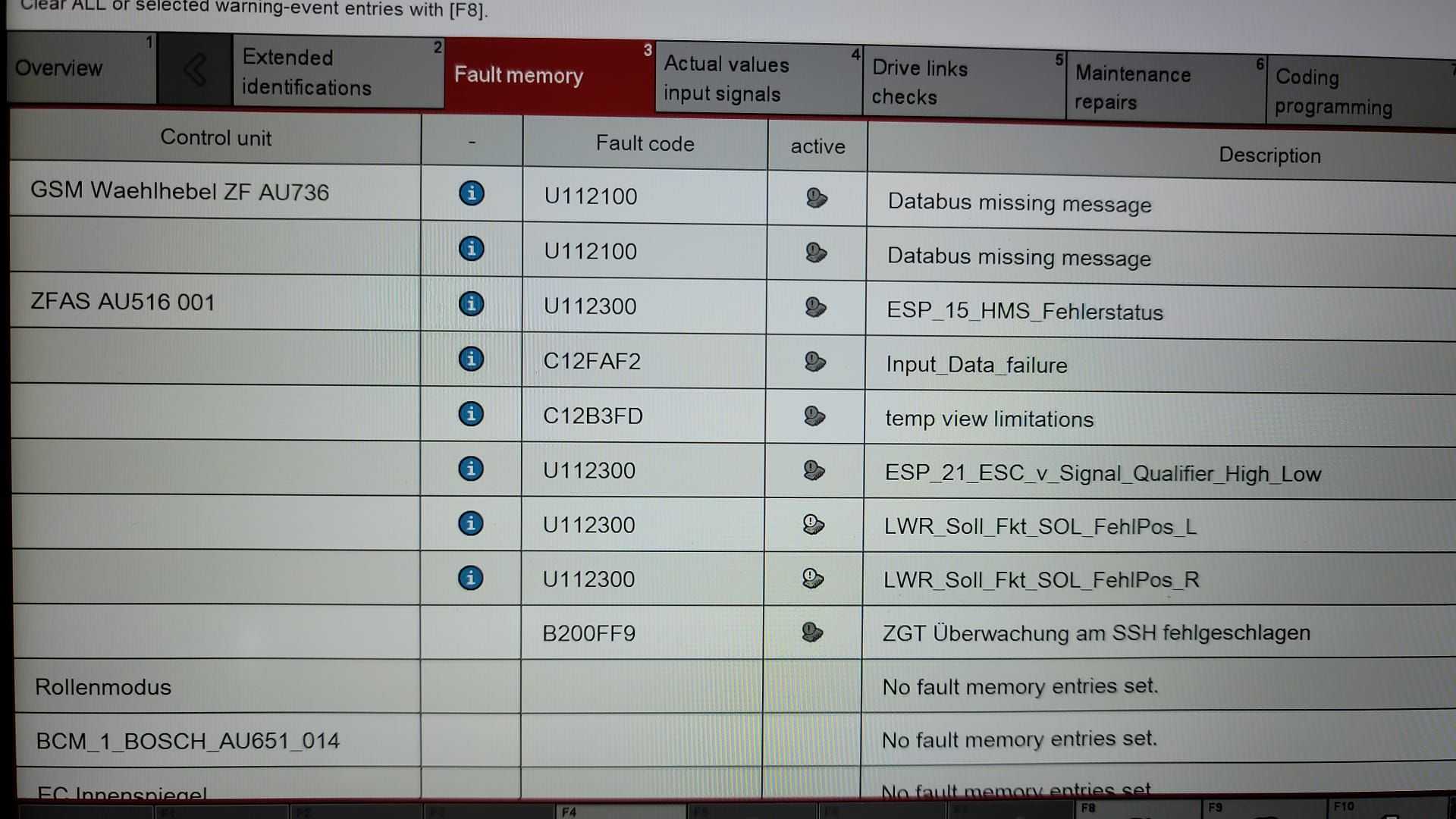
S4Auto-coding recovery pattern and failure symptomsrunbuhDec 11, 2022, 7:48 PM UTCView post #18515170

...put the settings BACK to the factory values, except for the 8G4...

[Quoted post: 18514581] Originally Posted by Woofman @runbuh The above section is where I'm getting lost. Does this mean to re-input the original values for "FAHRLICHTSCHALTUNG" (8K5), "LINKS-/RECHTSVERKEHR" (AV2) and "TYPPRUEFLAENDER/LAENDER M. BES ANDFORDERUNGEN" (B34) while leaving "LICHTASSISTENZSYSTEME set to 8G4" and then do Automatic Coding again? If it does I'm not following how this works. Or does this instead mean to re-input any previously entered customized settings - none in my case - that might have been erased during the first part of this procedure and then do the Automatic Coding again? I apologize for being so dense. I'm meeting with an independent Porsche workshop tomorrow about doing this coding and would like clarification if possible before then. Maybe this will make more sense to the workshop guys who are familiar with PIWIS. I joked with my Porsche dealership salesman yesterday that he may have to rescue me if we screw this up, my Cayenne gets bricked and then trucked to his dealership for them to fix. Thanks in advance for assistance.
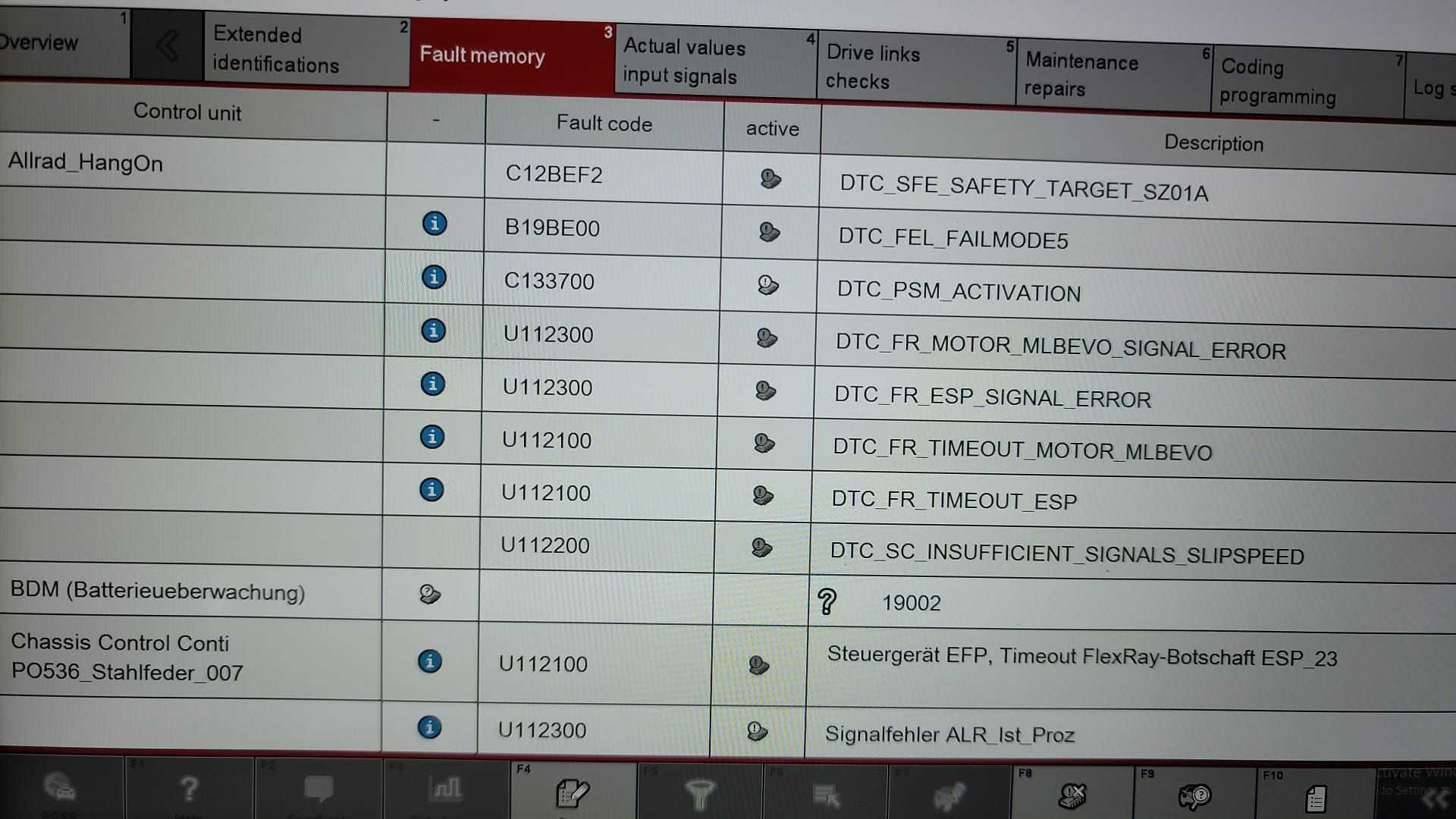
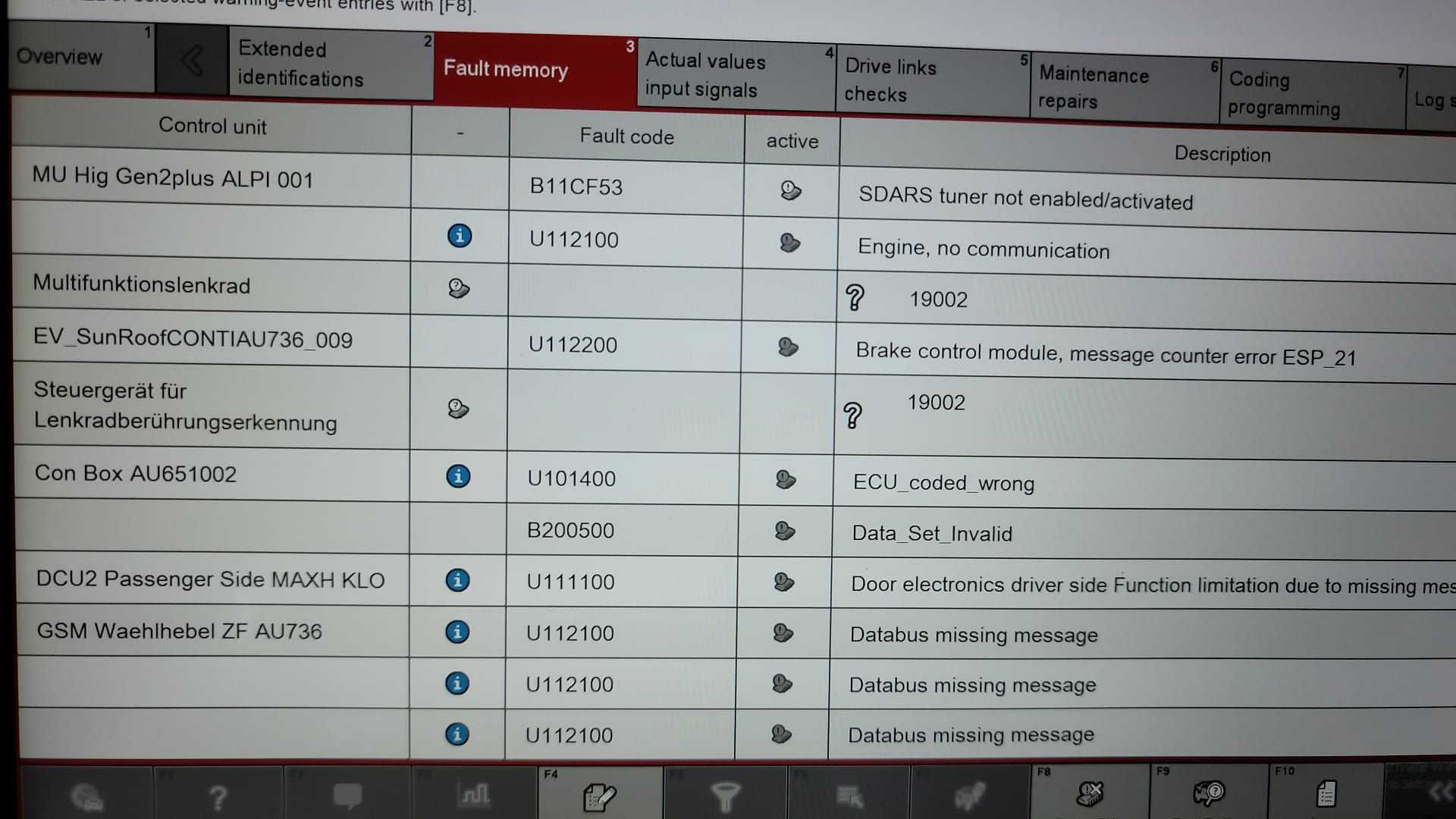
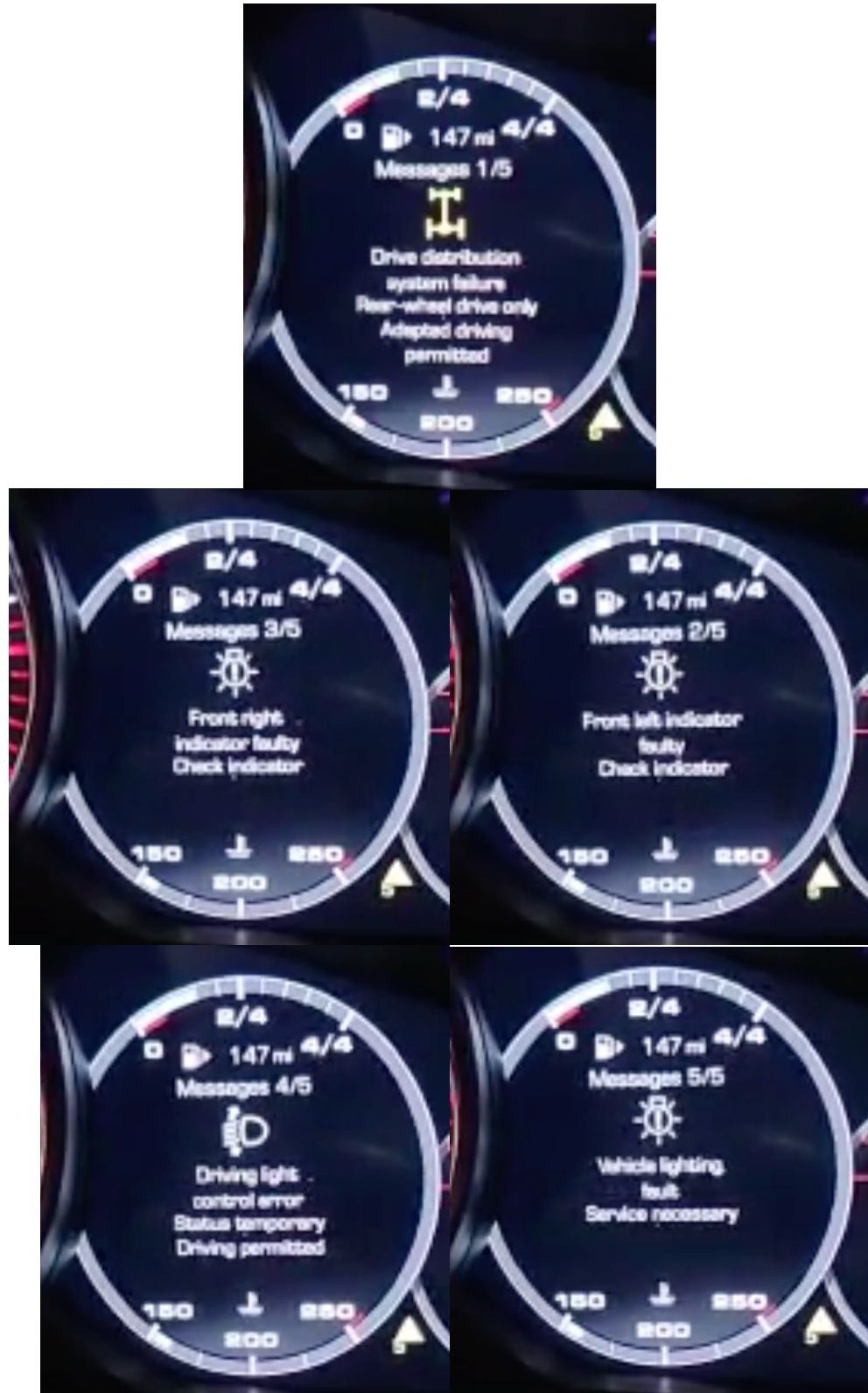
Keeping this real simple - you put the settings BACK to the factory values, except for the 8G4 as noted, and peform another Automatic coding (selecting all modules). If you do not revert those other 3 back to the factory settings, you will have constant, and unclearable, errors on your cluster and in PIWIS, your turn signals will CEASE TO FUNCTION, and your instrument cluster will be in German. Error 1/5 will clear once you start the car and put it in gear and back into Park. The rest don't go away (even via fault clearing in PIWIS) until after you revert the three settings and perform the autocoding. Note that my instrument panel errors screen shot below is after I reverted B2 back to B34, but hadn't done the others, yet. The errors shown would not clear until I reverted all 3 and did the autocoding. The PIWIS screen shots are just SOME of the errors after the first coding and before trying to clear the faults via PIWIS. Many went away by clearing them in PIWIS, many did not until I reverted/autocoded.

Service VAL backup habit

Useful before/after evidence-capture practice from PIWIS Additional Menu

S5Service VAL backup habitrunbuhDec 17, 2022, 11:09 PM UTCView post #18522644

...capture a ‘service’ VAL before, and another service VAL after...

[Quoted post: 18521974] Originally Posted by Woofman I just hope the weather is decent early Monday morning. The Porsche tech wants me to leave the car with him for the day and it's a long way for my wife to drive behind me if it snows as forecast. Morning rush hour in that part of Kansas City near the "Grandview Triangle" can be crazy dangerous even in decent weather.
If your vendor has time, see if they can capture a "service" VAL before, and another service VAL after, and provide you with the files. If I understand the terms correctly, you want a service VAL as opposed to an OBD VAL. Those fiiles should show us what changed. This is done within the "Additional Menu", not by some other automatic prompts to create a VAL.

Engineering Mode trace workflow

Most detailed owner description of saving PIWIS working-protocol XML traces for comparison

S6Engineering Mode trace workflowcayoNov 5, 2024, 2:35 AM UTCView post #19732150

...I recommend backing up one control unit at a time...

hello

here is the procedure I use to compare two files.

first of all you need save file or files of trace before and after the automatic encoding to do this, you must therefore enter the E (engineering) mode and select the control unit or control units interested in the comparison and go to encoding menu . (I recommend backing up one control unit at a time). In encoding select (manual coding without mcr regeln), in the next menu select all the items and continue with F12 until all the encoding parameters are displayed. Here, you choose to save the encoding data then press the F4-save key and then press F10-logs . From the drop-down menu choose (working log), in the next menu , name the trace file of the control unit that you want to save. File name need to typed in the box where there is usually a text like: ARP-20241104_77686.(in my case)

The name, for convenience could be like:

BCM2_DS99876

control unit name_last seven VIN

then established the file name it is saved with the save button next to it.

Already with this simple procedure a complete trace/coding file has been read with all the coding parameters that can be changed in engineering mode.

the file in question, the one that has just been saved can be found in:

E:\PiwisUserData\PIDT\Protokolle\Arbeitsprotokoll

I think that all piwis 3 save it in that default directory. The file, in my case, is found in the form of a name:

BCM2_DS99876_18.0.4.zip

inside the archive there is a file that I always think is named by default:

workingprotocol.xml

This is the first file I use for the comparison... the one without a certain encoding (example without PSE) ... before the automatic encoding..

Obviously we rename the xml file to what we want to be able to recognize it univocally.

The next step is the encoding of a certain optional/retrofit. I take PSE retrofit as an example. Coding the PSE as an example, three control units will be involved in the encoding: GATEWAY, DME and MIB. As is obvious, the three control units are automatically encoded, but first you need to change the vehicle order in engineering mode via the F7 menu in the main menu of piwis3. I do not describe the automatic coding process with PSE because I assume you already know how to proceed... in

V-mode change to 0P8 or 0P9 and change 2HB and so on ...............................................

then encoded the three control units via automatic coding, we obtain the modified coding for PSE on all three control units involved. (GATEWAY, DME and MIB)

Returning to piwis E-mode repeat the step described above for the three control units described, then read the coding data and then save the xml file as described in the previous steps.

At the end you will have 3 files of (GATEWAY, DME and MIB) before the optional/retrofit coding and a further 3 files after the coding inherent to the retrofit performed automatically.

It is obvious that the comparison between files makes sense to do it on files that all come from the same car. It is also possible to do them with two different cars of the same model, but often there are many differences.

By opening the two xml files of the same control unit before and after automatic coding, you can see which coding parameters the optional/retrofit coding has brought automatically. Once the differences are obtained, try manual coding to see if the optional actually activates in the same way.

For example, BMW that codes an optional in automatic coding or manual coding does not change anything ... if the codings done manually are correct, the optional activates in any case without any difference and without problems.

in this way, the comparison is more direct and targeted ...

I used this procedure to switch from 8-way seats to 18-way seats that worked perfectly in every way. Suffice it to say that I compared the differences of the xml trace files with my originals with 8-way seats compared with trace files of an example car with 18-way seats present on piwis 3 those of the simulation mode...

if you have any questions I am available.

PIWIS 38.25 MODE E

Manual versus automatic coding

Sources agree automatic coding can be broad and risky, but they differ on whether it should be avoided, used only as a discovery step, or used for certain...

S7Manual versus automatic codingJohn MclaneJan 4, 2021, 5:59 AM UTCView post #17137226

...automatic coding after changing the option list… and module by module...

[Quoted post] Originally Posted by John__C So just for clarity, please confirm or correct the following. I believe you are saying that... 1. the dealership updated the software on your car. 2. the car software update erased your previous PIWIS coding edits (I'll assume all of them) 3. when the car software was updated, PIWIS 38.2 would no longer recode your car but that 39.7 (which did not work previously) will now recode your car. 4. you have now recoded *** and Matrix HL using PIWIS 39.7 5. you will now restore coding of the remaining elements that were lost with the cart software upgrade (ApplePlay, etc.) Is that all correct? If so, it is a fairly significant discovery. It suggests car software updates will require a recode each time and that they may require newer PIWIS versions so that a future car software update might wipe out your programming and that you might not be able to redo the changes as the new software might require an even never PIWIS version (the you don't/won't have). Thanks.
1, 2,3 and 5 yes. 4 I think so. Anytime there's an update for the DME or PCM you can expect the changes you make to be partially or totally overwritten, that much I expected. Good thing is that is not often at all. I think they upgraded the compatible version of my car because they were having problems communicating with one of the modules. That's not something they would do frequently as it takes time. There's two ways of coding as discussed before, one using automatic coding after changing the option list (F7 menu) and module by module. I think the former may be limited when they upgrade the car software but the latter not so much, due to backwards compatibility. The situation I had was unique where the PIWIS software was ahead the car software. I'm going to try module coding with both versions and see what happens. We're flying blind here as this is largely conjectural as there's no official literature to refer to. I could be completely wrong in my assertion and the error I got was unrelated to the version. Lots of quirks, not necessarily following any logic. Read OBDeleven forum where Audi guys discuss several similar modules. Some coding require e-brake activation, others headilights on. I recall reading that key fob programming on Porsche requires the hazard on.

Target-specific module locations

Selected evidence includes disputed target-feature coding locations, especially auto start/stop; these should be used only to explain why target-specific...

S8Target-specific module locationsrunbuhMay 26, 2021, 8:04 PM UTCView post #17455149

...looking to see what changed, and then UNDOING those changes....

[Quoted post: 17454557] Originally Posted by rbrunelle So I just found this thread and unfortunately for some, I can see that messing with the auto programming settings has caused some problems. Let me help you understand how the PIWIS works. When you go to the additional menu settings, you are not programming any modules. What you are doing is changing the defaults for when you run auto programming. This is a very dangerous, as this programming should stay stock, so that you can always use auto programming to restore your module back to stock. Also this section lets you add options your car does not have and that causes other modules to be programmed incorrectly. The other modules will look to receive information from missing modules and give you errors if you run auto program all modules. Please leave the auto programing found in the add menu alone, instead, go into the module you need, the go to manual programing. Please note that in Engineering mode, all modules appear present, even they are not in your car. In production mode, those modules are not visible. In engineering mode when you go into the module and go to the extended identifications, if you get 11070 error everywhere, that means your car doesn't have that module. For example, Auto start Stop is located in the Gateway Module. Select the Gateway module then hit next. Then go to the programing tab and make the changes you need. You can turn off *** here without worries about impacting other modules. If you sell the car, simple run the auto programming for this module and it will be returned to normal. I hope this helps.
Auto Start/Start is in two modules for the E3, DME and Front-End Electronics, as documented earlier in this thread, discovered 100% by changing settings using @John Mclane' process, looking to see what changed, and then UNDOING those changes by following the same process, again (just going back to the original setting). I then re-made the targeted changes via an x431 to ensure they worked. I'm not trying to argue your point. You are very correct that you could be changing settings that have a negative impact, but you can "unchange" those same settings using the same process. One can easily make the case that using regular coding is an effort fraught with peril. You can easily take your car places where a dealer, and cold hard cash, are the only way to get your car back.
S9Target-specific module locationsrbrunelleMay 26, 2021, 8:04 PM UTCView post #17463943

...correct module is Gateway...

[Quoted post: 17455149] Originally Posted by runbuh Auto Start/Start is in two modules for the E3, DME and Front-End Electronics, as documented earlier in this thread, discovered 100% by changing settings using @John Mclane' process, looking to see what changed, and then UNDOING those changes by following the same process, again (just going back to the original setting). I then re-made the targeted changes via an x431 to ensure they worked. I'm not trying to argue your point. You are very correct that you could be changing settings that have a negative impact, but you can "unchange" those same settings using the same process. One can easily make the case that using regular coding is an effort fraught with peril. You can easily take your car places where a dealer, and cold hard cash, are the only way to get your car back.
You still don't get it. Messing in the engine module and the Front BCM is wrong. The engine module is looking for the signal from the start stop module. If you say not present and it is present, it will give an implausible signal error. The ECM does not need to be touched. likewise with the Front BCM. It is getting the signal from the stop light switch and the Start stop disable switch. It sends these signals to the gateway module which controls the start stop. The start stop module is a relay that sends a signal to the engine module to stop and takes power from non switched fuses and sends it into two main normally switched power lines. When the battery is strong enough, the car inside air temperature is near the setpoint selected by the user and the stop light switch (on the brake pedal) is on, the gateway module signals the stop start relay to engage which sends a signal to the engine module to stop and powers the circuits I mentioned. Simply going into the gateway module in engineering mode and telling the gateway module not to engage the relay is all that is needed to permanently disable this function.

Backup comparison method

Owners agree on before/after capture, but differ on whether full-vehicle VAL/ZDC comparison or per-control-unit Engineering Mode traces are better

S10Backup comparison methodfifthBroNov 5, 2024, 2:35 AM UTCView post #19732226

...When creating full VAL, you’re not running at risk of missing a module...

[Quoted post: 19732150] Originally Posted by cayo hello here is the procedure I use to compare two files.
Thanks, it makes sense to use working protocol files, if you are making well understood, isolated changes. But for changes to Vehicle variant applied via autocoding, it seems like really laborious way. Your method involves creating manually, module by module, what VAL would generate for all modules out of box. When creating full VAL, you�re not running at risk of missing a module that may/may have not changed. And thanks to the tool that @bigkraig created and posted above, comparing VAL files will be super easy. Also, as I stated above, if you want to see actual changes applied to the car with autocoding, taking snapshots of ZDC files will give you that. But hey, everyone has their own ways of doing things (I guess).
S11Backup comparison methodcayoNov 5, 2024, 2:35 AM UTCView post #19736327

...both methods are fine...

[Quoted post: 19732226] Originally Posted by fifthBro Thanks, it makes sense to use working protocol files, if you are making well understood, isolated changes. But for changes to Vehicle variant applied via autocoding, it seems like really laborious way. Your method involves creating manually, module by module, what VAL would generate for all modules out of box. When creating full VAL, you�re not running at risk of missing a module that may/may have not changed. And thanks to the tool that @bigkraig created and posted above, comparing VAL files will be super easy. Also, as I stated above, if you want to see actual changes applied to the car with autocoding, taking snapshots of ZDC files will give you that. But hey, everyone has their own ways of doing things (I guess).
The difference is that performing a VAL the piwis takes quite a bit of time... like isolated control units it is faster... In any case, both methods are fine. The solution proposed by github is certainly good too, but I don't know how to use it.

Voltage support and battery maintainer cautions

Forum posts repeatedly warn to use substantial external power for PIWIS coding, with owner-reported values ranging from 50+ amps to 70A+, 75A, 80A, and a...
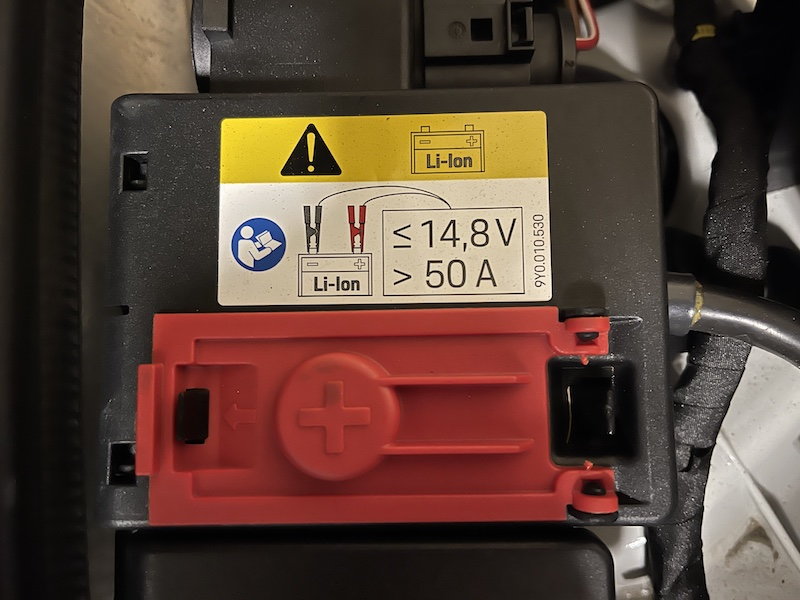
S12Voltage support and battery maintainer cautionsrunbuhJan 1, 2021, 9:21 AM UTCView post #17131839

...power you need (50+ amps)...

I guess this is clear explanation of the kind of power you need (50+ amps) when hooking up an external power source. It's amazing what you can find when you just open your eyes.


Faults, overwritten coding, and recovery habits

Owners report that coding can produce transient or persistent faults, changed UI behavior, nonworking systems, and erased customizations. Some owners...
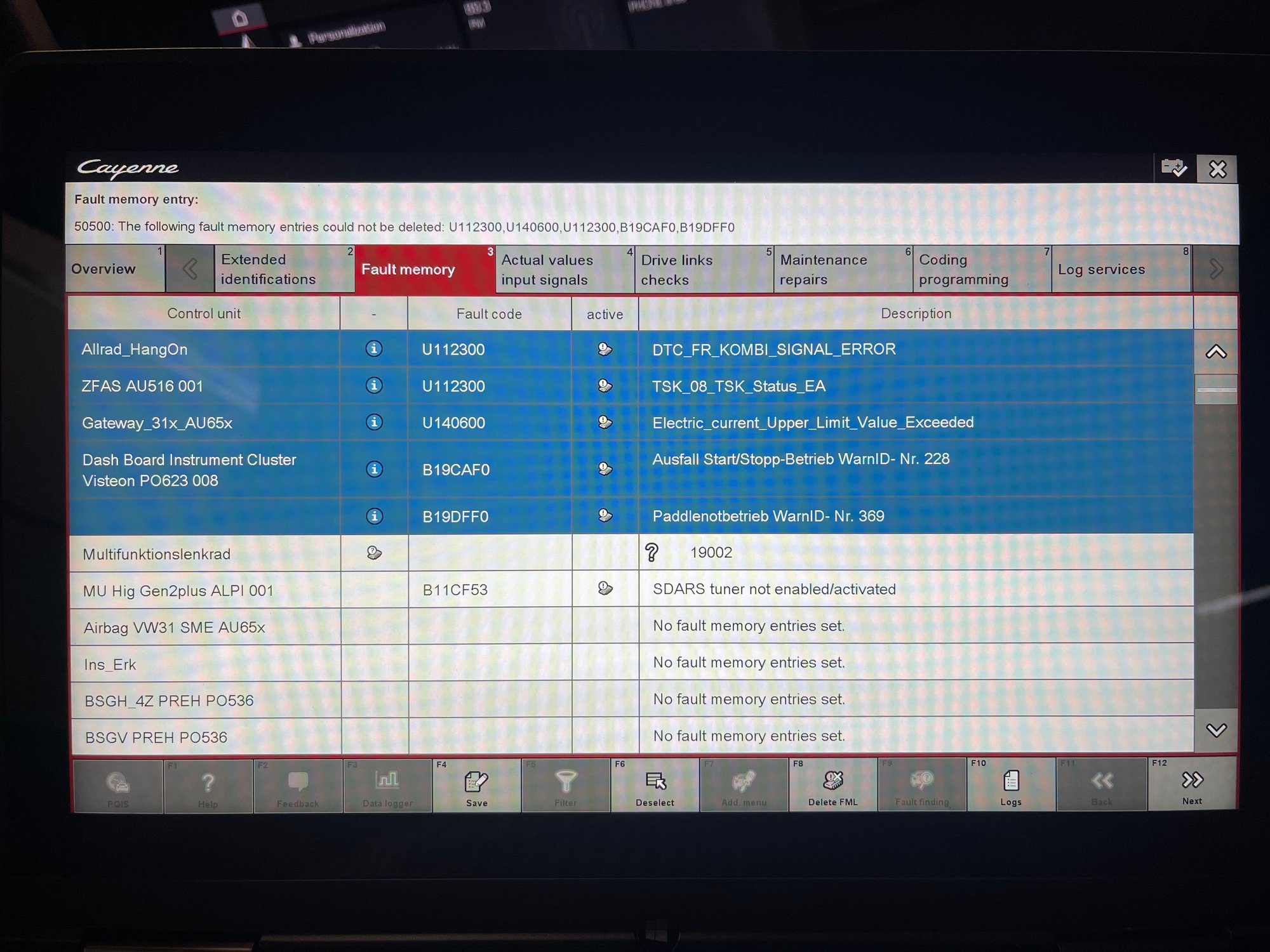
S13Faults, overwritten coding, and recovery habitsrunbuhJan 1, 2021, 9:21 AM UTCView post #17132041

...TPMS is on the fritz… Fault Memories that cannot be cleared....

Well - this is a small bit of a fuster-cluck. After going the "Additional menu" route and following through with the automatic coding of all modules (which does take a while), I only have the following to show for it:
- TPMS is on the fritz. It's not measuring anything. Even after driving a couple of miles at speeds > 15mph, setting the tires to winter, driving a couple more miles, setting back to A/S tires, then driving a couple more miles, there is no measurement. I need to go RTFM.
- I have Fault Memories that cannot be cleared
- AUTO START STOP IS STILL ACTIVE. I can no longer add start/stop to the home panel on the central PCM screen, but I can assign it to the diamond key, and it is definitely still shutting off my engine. Fark fark fark.
I'm gonna let the car sit for a bit (like an hour) and see what happens.


Faults I can't delete (yet)
Edit: I used PIWIS 39.8 to do this work.
S14Faults, overwritten coding, and recovery habitsJohn MclaneJan 1, 2021, 9:21 AM UTCView post #17132077

...You can always swing back the options and re-code back to stock....

[Quoted post] Originally Posted by runbuh Well - this is a small bit of a fuster-cluck. After going the "Additional menu" route and following through with the automatic coding of all modules (which does take a while), I only have the following to show for it: - TPMS is on the fritz. It's not measuring anything. Even after driving a couple of miles at speeds > 15mph, setting the tires to winter, driving a couple more miles, setting back to A/S tires, then driving a couple more miles, there is no measurement. I need to go RTFM. - I have Fault Memories that cannot be cleared - AUTO START STOP IS STILL ACTIVE. I can no longer add start/stop to the home panel on the central PCM screen, but I can assign it to the diamond key, and it is definitely still shutting off my engine. Fark fark fark. I'm gonna let the car sit for a bit (like an hour) and see what happens. Edit: I used PIWIS 39.8 to do this work.
I'm sorry this happened. You can always swing back the options and re-code back to stock. I had to do that with a similar issue regarding options that I did not had hardware for. I managed to get rid of the *** using the alternate menu, without any errors afterwards. Baby steps, one or two options at a time. I also noticed that there's a propensity for errors the lower the battery is, even with an external charger. This is worse with the AGM battery on the 992 than on the Lithium on the cayenne. My guess is that the current (A) requirement is very stringy for code writing.
S16Faults, overwritten coding, and recovery habitsJohn__CJan 4, 2021, 5:59 AM UTCView post #17137197

...expect the changes you make to be partially or totally overwritten....

[Quoted post: 17137153] Originally Posted by John Mclane They updated the overall software of the car, so my newer version is the only one working (dia boot laptop).
So just for clarity, please confirm or correct the following. I believe you are saying that... 1. the dealership updated the software on your car. 2. the car software update erased your previous PIWIS coding edits (I'll assume all of them) 3. when the car software was updated, PIWIS 38.2 would no longer recode your car but that 39.7 (which did not work previously) will now recode your car. 4. you have now recoded *** and Matrix HL using PIWIS 39.7 5. you will now restore coding of the remaining elements that were lost with the cart software upgrade (ApplePlay, etc.) Is that all correct? If so, it is a fairly significant discovery. It suggests car software updates will require a recode each time and that they may require newer PIWIS versions so that a future car software update might wipe out your programming and that you might not be able to redo the changes as the new software might require an even never PIWIS version (the you don't/won't have). Thanks.
S17Faults, overwritten coding, and recovery habitsJohn__CMar 23, 2021, 7:59 AM UTCView post #17389822

...all I have managed to do is to get the ‘check engine light’ to stay on....

After an additional 6 hours of poking around, it still isn't working. All I have managed to do is to get the "check engine light" to stay on (and did I do something to break the clock time zones?)

Do you guys use "auto code" or "auto program"? I've done both now. To no avail.

I'm using 39.9. I tried booting to 39.7, but for some reason I don't get the "Maintenance of vehicle data" option in 39.7, just the "Vehicle data maintenance with PIWIS-ONLINE" (which obviously will not work).

I was not clearing the faults. I might go back and try to do that just to see if doing so clears the check engine light. Getting back to where I started might be a pyrrhic victory but that would be an improvement from where I am now.

What I really wish I could accomplish would be to make the car default to Individual Mode at startup. Then *** wouldn't matter because it is toggled off in Individual. I was just starting with *** because I thought it would be super easy. Are you guys aware of any solution that defaults to Individual mode? While I was hoping to enable Matrix lights and turn off various nags, at this point I'd gladly take the foundational win, declare victory, and move on to another project.

Fixed-mode charging and connection uncertainty

One owner warns that fixed-mode charging can be dangerous if left connected without vehicle consumption. Another owner’s voltage-readout mismatch and...
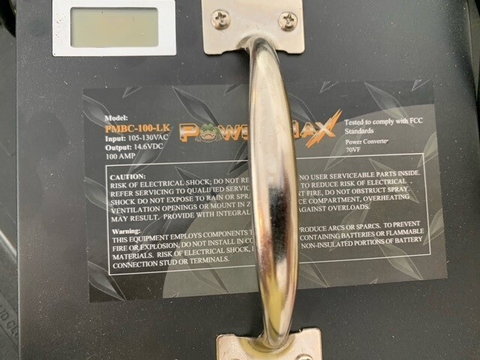
S15Fixed-mode charging and connection uncertaintyJohn MclaneJan 1, 2021, 9:21 AM UTCView post #17132749

...not to overcharge the battery by leaving in fixed mode without consumption...

[Quoted post] Originally Posted by runbuh Ok - mine is on order. Are you using the smart charging mode, or the fixed mode?
I spoke directly with the maker (name gave to me by batterystuff guy) and he told me for coding stick to fixed mode. It works well, no low battery or lack of voltage in modules so far. I may use the smart mode a couple of hours before start coding, changing to fixed mode at that time. This way the battery is juiced up from the get go. Remember not to overcharge the battery by leaving in fixed mode without consumption (eg turned off), that's dangerous.
S18Fixed-mode charging and connection uncertaintyJohn__CApr 26, 2021, 12:36 AM UTCView post #17390115

...PIWIS… reported a voltage… one and a half volts lower....

[Quoted post: 17390076] Originally Posted by John Mclane What power source are you using?
I am connecting to the terminals under the hood. I have it switched to constant voltage as well, so I was assuming everything was good for power but I did notice at one point that the PIWIS came back and reported a voltage that was roughly one and a half volts lower than what the charger was reading. Do you see the same values across them? And if not, which do you trust? I was able to clear all of the faults and that removed the check engine light. I also was able to get the clock working properly, so we are back to square one - which feels pretty good. At least I haven't messed anything up. I might take another swing at it using 39.7 when I get a few hours to focus on it. Still want to confirm whether you guys have been using auto code or auto program. Thanks. I do appreciate you guys trying to help me work through this.

What the evidence supports

The forum evidence is useful as reusable PIWIS III coding context, not as a universal feature-coding recipe. Owners repeatedly describe 9Y0/E3 coding as experimental work where wrong option data, broad automatic coding, weak power support, or version mismatch can leave faults, erased customizations, or nonworking vehicle behavior (S1, S3, S13, S17: [1], [3], [13], [16]).

Single report: later thread evidence adds a concrete recovery-limit example outside PIWIS III. A Thinkdiag+ user reported accidentally changing a PCM menu VW-coding value from Porsche to Lamborghini; after switching it back, some functions returned but navigation and Bluetooth remained unavailable, and a later dealer software reload still left navigation activation and Bluetooth availability unresolved ([19], [20]).

Single report: the Matrix LED workflow has later owner-result support, but not proof of always-on behavior. A later owner said the Matrix-headlight changes worked for him while also noting that many operating conditions still limit activation, so target Matrix docs should keep the condition limits visible instead of treating coding as unconditional activation ([21]).

Common report: substantial external power is part of the owner-reported setup. Owners mention 50+ amps, 70A+, 75A, 80A, and a paraphrased Porsche 90A recommendation, but the packet does not establish one universal amperage for every owner coding task (S1, S3, S12: [1], [3], [12]). Porsche campaign documents support the general concern: in those specific campaign contexts, Porsche required stable voltage, a suitable high-current charger, and a USB connection between PIWIS and the VCI ([22], [23]).

Porsche via NHTSAJan 1, 2018, 12:00 AM UTCView post

vehicle voltage must be maintained between 13.5 volts and 14.5 volts

Porsche via NHTSAJan 1, 2018, 12:00 AM UTCView post

Battery charger with a current rating of at least 90 A

Common report: before/after capture is the strongest reusable habit in the packet. Owners describe service VALs, Engineering Mode working-protocol XML traces, full VAL/ZDC comparisons, and one-control-unit-at-a-time traces as ways to see what changed; none of those posts prove a guaranteed restore system (S5, S6, S10, S11: [5], [6], [10], [11]).

PIWIS version, hardware, and access

Conflicting reports: the source thread does not establish one universal PIWIS III version for owner coding. Treat version numbers, clone/original hardware, VAS/VCI interface details, Engineering Mode access, and online/PPN behavior as compatibility clues tied to vehicle year, PIWIS build, and the specific coding target, not as settled requirements. S1: [1]

Reported version or hardware clue What the thread supports Source
PIWIS 3, original or clone Earliest thread framing says PIWIS 3 was required and that owners were working with original or clone tools; this supports only a broad tool-family requirement, not a specific build. S1: [1]
PIWIS 2 at a shop One owner moved away from a planned shop after learning it had only PIWIS 2; this supports screening shop capability for E3 coding rather than assuming any Porsche diagnostic setup can perform the target workflow. [24]
VAS6154 license/date access reports Owners reported a VAS6154 license ending 31.12.2020 and connection workarounds such as setting the PIWIS laptop date back to late December 2020 or 12/1/2020; these are clone/access clues, not validated setup instructions. [25]; [26]; [27]
Module visibility and VCI variability One owner says some PIWIS/clone combinations do not see modules or manage coding even in Engineering Mode, and a later 41.400/VCX owner reported missing modules and considered OEM VAS6154A or a newer PIWIS build. [28]; [29]
PIWIS 39.8 and 39.9 / 39.7 / 38.2 / 40 One owner later edited a failed start/stop attempt to say he used PIWIS 39.8; another exchange mentions 39.9, a 39.7 path exposing only PIWIS-ONLINE vehicle-data maintenance, and a reply that 38.2 may help while version 40 may be needed for dashboard encoding. S13: [13]; [30]
PIWIS 40.0 on a 2022 Cayenne A shop attempt reportedly could not get PIWIS 3 version 40.0 into Engineering Mode on a 2022 Cayenne, and a follow-up says not all PIWIS versions manage coding even when Engineering Mode exists. [31]; [28]
PIWIS 41.400 and clone/VAS 6154-style hardware The Matrix LED workflow report says it used PIWIS 41.400; the same owner later described a 2019 Cayenne S using PIWIS 41.400 on a modified Chinese-clone setup with a VAS 6154 USB/OBDII dongle rather than the official Porsche VCI. S3: [3]; [32]
PIWIS III Engineering Mode 38.25 The trace-file comparison workflow is a later owner report using PIWIS III Engineering Mode version 38.25; it supports that build for the described backup/trace workflow, not universal feature coding. S6: [6]

Use the version and access table as a preflight checklist before relying on a target procedure. Confirm the exact tool family, PIWIS build, Engineering Mode access, module visibility, VCI/clone hardware, and whether the feature needs online Porsche activation; the thread shows failure modes at each layer rather than a single "PIWIS III works" rule ([24], [31], [28], [25], [27], [33]).

  • Ask the shop or tool owner whether it is PIWIS III for the target vehicle, not merely Porsche diagnostics; one owner changed shops after a PIWIS 2-only discovery and another PIWIS III v40.0 attempt could not enter Engineering Mode on a 2022 Cayenne ([24], [31]).
  • Verify module visibility with the actual car before editing values; owner reports describe grayed-out lines, missing modules, and VCI/build combinations that may not expose required modules ([28], [29]).
  • Treat date/license workarounds on clone VAS6154 setups as evidence of access fragility, not a recommendation to bypass licensing or time checks ([25], [26], [27]).
  • For retrofits or features absent from the car at build, check whether Porsche online activation is required before assuming F7 or manual coding is enough ([33], [34]).

Non-PIWIS tool boundary: the thread includes Launch/x431 and Thinkdiag discussions, but they are not interchangeable proof for PIWIS III workflows. One owner describes x431 as a "poor-man's PIWIS" used for maintenance/coding examples, while the Thinkdiag+ PCM incident shows a third-party coding path can expose risky values and recovery may require more than reversing the visible setting ([35], [36], [19], [20]).

Use non-PIWIS posts as context for tool boundaries or target-specific docs, not as evidence that a PIWIS menu path, x431 setting, and Thinkdiag screen have the same semantics ([35], [36], [19]).

Official activation boundary: one report says that for features not present from the factory, local coding may not be the whole job. In the Surround View retrofit exchange, one owner suspected an activation step requiring online PIWIS/Porsche account access and funds, while another said F7 might be worth trying but might not be enough ([33], [34]).

General PIWIS paths and evidence-capture references

Module/menu path Reported value Notes Source
PIWIS Engineering Mode > Diagnostics > F7 / Additional menu > maintenance data Vehicle option/default data, then Save (F8) Reported as the area used before automatic programming; another owner cautions that these are defaults for auto programming, not direct module coding. S1, S2: [1], [2]
All modules > Coding > Automatic Coding Automatic coding after option/default changes Broad owner workflow; reported to erase prior custom codings and produce many faults in some cases. S3, S4: [3], [4]
Additional Menu VAL capture “service” VAL before and after Owner-reported evidence-capture habit; the post distinguishes service VAL from OBD VAL. S5: [5]
Engineering Mode > selected control unit > encoding menu > manual coding without mcr regeln > F4-save > F10-logs > working log workingprotocol.xml trace Owner-reported per-control-unit before/after comparison workflow. S6: [6]
E:\PiwisUserData\PIDT\Protokolle\Arbeitsprotokoll Working-protocol ZIP/XML location reported by one owner Single report; useful for locating saved traces, but version/install paths may vary. S6: [6]

Preflight checklist

Use this as a preparation and documentation checklist around a target-specific coding document. It does not supply feature values, module choices, or automatic-coding approval by itself.

  • Start from target-specific evidence for the exact feature and vehicle; do not reuse module names or option values from another target, because even start/stop module location is disputed in the source thread (S8, S9: [8], [9]).
  • Confirm the tool and access path before coding: PIWIS III versus PIWIS 2, Engineering Mode access, visible target modules, VCI/clone behavior, and possible Porsche online activation are all separate checks in the thread ([24], [31], [28], [25], [33]).
  • Put the vehicle on substantial external power before coding; owner reports cite 50+ amps or 70A+ for coding work, while Porsche campaign excerpts support at least 90A only in those specific campaign/service contexts (S1, S3, S12: [1], [3], [12]; [22]).
  • Keep PIWIS communication stable and follow PIWIS prompts; Porsche campaign instructions support USB connection to the VCI and say the PIWIS instructions take precedence in those official procedures ([22], [23], [37]).
  • Capture a before snapshot: owner-supported options include a service VAL from the Additional Menu or Engineering Mode working-protocol XML traces for the control units being compared (S5, S6: [5], [6]).
  • Record the original values and limit changes to the smallest target-specific set the evidence supports; owners specifically warn that coding multiple items can make later troubleshooting harder (S1, S3: [1], [3]).
  • Treat automatic coding as a broad workflow, not a default shortcut: the source thread says F7/Additional-menu edits can change auto-programming defaults, and one owner reports automatic coding erased prior custom codings (S2, S3, S7: [2], [3], [7]).
  • After the change, capture an after snapshot and compare it to the before snapshot; owners split between full VAL/ZDC comparison for broad autocoding and one-control-unit traces for isolated changes, with one poster concluding both methods are usable depending on the job (S5, S6, S10, S11: [5], [6], [10], [11]).
  • If faults or bad behavior appear, use the before record as the reference for returning values toward the original state, but do not assume a simple revert will fully recover every coding error; owner reports describe clearing faults and restoring original values as recovery habits, while the later Thinkdiag+ PCM incident remained unresolved after reversal and dealer work (S4, S13, S14, S17: [4], [13], [14], [16]; [19], [20]).

Decision points and unresolved items

Topic Confidence What to carry into target-specific coding docs Source
Manual versus automatic coding conflicting reports Explain the tradeoff. Manual/targeted coding may reduce scope when the module and value are known; automatic coding may be part of some owner workflows but can reset customizations or code modules around missing equipment. S2, S3, S7: [2], [3], [7]
Battery charger rating common report, exact spec needs verification Use strong external power language. Do not state one universal owner-coding amperage from this packet alone; official 90A references are campaign-specific support. S1, S3, S12: [1], [3], [12]; [22]
Fixed-mode charging needs verification One owner reports using fixed mode for coding but warns against leaving it connected without vehicle consumption; the evidence does not resolve charger mode, terminal location, or voltage-reading mismatch. S15, S18: [17], [18]
Backup comparison method common report, method varies Service VAL, full VAL/ZDC comparison, and per-control-unit XML traces are all owner-reported options; choose based on whether the change is broad or isolated. S5, S6, S10, S11: [5], [6], [10], [11]
PIWIS version, hardware, and access conflicting reports Treat version, clone/original hardware, VCI, Engineering Mode access, and module visibility as owner-specific until the target procedure or official document gives a requirement. S1: [1]; [25], [27], [28], [29]
Non-PIWIS tools tool-specific, not interchangeable Launch/x431 and Thinkdiag posts can show parallel owner experiences, but do not use them as proof that a PIWIS III path has the same setting names, access, or recovery behavior. [35], [36], [19], [20]
Official online activation single report, needs target confirmation Some retrofits or features absent from factory equipment may require Porsche online activation, account access, or paid activation rather than only local F7/manual coding. [33], [34]
Recovery limits common report plus later failure example Preserve before/after records and original values, but present recovery as a habit, not a guarantee; one later PCM coding incident remained partially unresolved after reversal and dealer work. S4, S14: [4], [14]; [19], [20]
Dealer or official software updates common report Keep records of prior coding because owner reports say DME/PCM or broader software updates may partially or fully overwrite custom coding. S7, S16: [7], [15]

Cited source posts

37 sources
  1. [1] Rennlist post 17051085
  2. [2] Rennlist post 17454557
  3. [3] Rennlist post 18510008
  4. [4] Rennlist post 18515170
  5. [5] Rennlist post 18522644
  6. [6] Rennlist post 19732150
  7. [7] Rennlist post 17137226
  8. [8] Rennlist post 17455149
  9. [9] Rennlist post 17463943
  10. [10] Rennlist post 19732226
  11. [11] Rennlist post 19736327
  12. [12] Rennlist post 17131839
  13. [13] Rennlist post 17132041
  14. [14] Rennlist post 17132077
  15. [15] Rennlist post 17137197
  16. [16] Rennlist post 17389822
  17. [17] Rennlist post 17132749
  18. [18] Rennlist post 17390115
  19. [19] Rennlist post 20028645
  20. [20] Rennlist post 20046417
  21. [21] Rennlist post 20313698
  22. [22] static.nhtsa.gov source 22
  23. [23] static.nhtsa.gov source 23
  24. [24] Rennlist post 18521756
  25. [25] Rennlist post 17167670
  26. [26] Rennlist post 17167974
  27. [27] Rennlist post 17388918
  28. [28] Rennlist post 18525348
  29. [29] Rennlist post 19186667
  30. [30] Rennlist post 17390128
  31. [31] Rennlist post 18525340
  32. [32] Rennlist post 18525407
  33. [33] Rennlist post 17500430
  34. [34] Rennlist post 17500546
  35. [35] Rennlist post 17226650
  36. [36] Rennlist post 17226743
  37. [37] static.nhtsa.gov source 37